


As a seasoned supplier of Telecom Power Cabinets, I understand the significance of a proper installation process. A well - installed Telecom Power Cabinet not only ensures the stable operation of communication equipment but also extends the service life of the cabinet itself. In this blog, I'll guide you through the step - by - step process of installing a Telecom Power Cabinet on the floor.
Pre - installation Preparations
Before you start the actual installation, there are several key preparations that you need to complete.
Site Inspection
First and foremost, conduct a thorough site inspection. The floor where the Telecom Power Cabinet will be installed should be flat and level. Any unevenness can lead to instability of the cabinet, which may cause potential safety hazards. Measure the floor surface to ensure it can support the weight of the cabinet. The weight of a Telecom Power Cabinet varies depending on its size and components, so it's crucial to check the floor's load - bearing capacity.
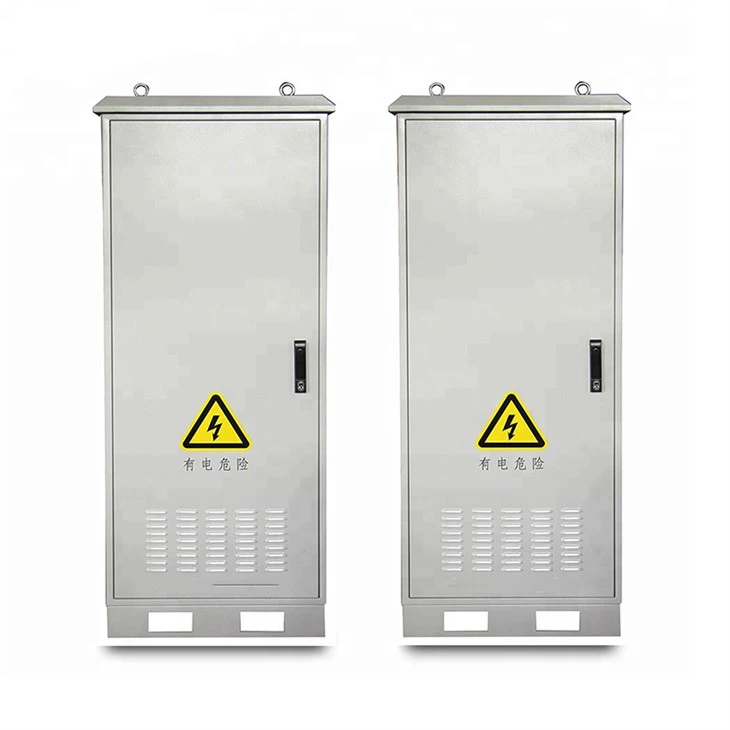
You can find more information about our high - quality Telecom Power Cabinet on our website.
Clear the Installation Area
Clear the installation area of any debris, tools, or other objects. This not only provides a clean and safe working environment but also ensures that there are no obstacles during the installation process. Make sure there is enough space around the cabinet for ventilation and maintenance. A general rule of thumb is to leave at least 500mm of clearance on all sides of the cabinet.
Gather Necessary Tools and Materials
Prepare all the tools and materials required for the installation. Common tools include wrenches, screwdrivers, drills, and measuring tapes. You'll also need appropriate fasteners such as bolts and nuts. Ensure that all tools are in good working condition and that you have the correct sizes of fasteners for the cabinet.
Check the Cabinet Components
Inspect the Telecom Power Cabinet and its components before installation. Check for any signs of damage during transportation, such as dents, scratches, or loose parts. Make sure all the internal components, such as power modules, battery racks, and circuit breakers, are properly installed and securely fixed inside the cabinet.
Installation Steps
Positioning the Cabinet
Carefully position the Telecom Power Cabinet on the pre - prepared floor area. Use a measuring tape to ensure that the cabinet is aligned correctly. It should be placed in a location that is easily accessible for maintenance and close to the communication equipment it will power.
Leveling the Cabinet
After positioning, use a spirit level to check if the cabinet is level. If it's not, adjust the leveling feet of the cabinet until it is perfectly horizontal. A level cabinet is essential for proper operation and to prevent stress on the internal components.
Securing the Cabinet to the Floor
Once the cabinet is level, it's time to secure it to the floor. Mark the positions of the mounting holes on the floor according to the cabinet's base. Then, use a drill to make holes in the floor at the marked positions. Insert the appropriate bolts into the holes and secure the cabinet using nuts. Make sure the bolts are tightened firmly to prevent the cabinet from moving.
Connecting the Power Cables
Before connecting the power cables, ensure that the power supply is turned off. Connect the input power cables to the main power input terminals of the cabinet. Follow the wiring diagram provided with the cabinet to ensure correct connections. Pay attention to the polarity of the cables to avoid short - circuits.
Installing the Battery System
If the Telecom Power Cabinet is equipped with a battery system, install the batteries according to the manufacturer's instructions. Connect the battery cables to the battery terminals in the cabinet. Make sure the battery connections are tight and secure.
Testing the System
After all the connections are made, turn on the power supply and conduct a system test. Check the voltage, current, and other parameters on the control panel of the cabinet. Ensure that all the internal components are functioning properly and that there are no abnormal noises or alarms.
Post - installation Checks
Once the installation is complete, perform a series of post - installation checks.
Visual Inspection
Conduct a visual inspection of the entire installation. Check for any loose connections, exposed wires, or signs of damage. Make sure all the doors and panels of the cabinet are properly closed and locked.
Function Testing
Test the functionality of all the features of the Telecom Power Cabinet. This includes testing the power output, charging system, and protection functions. Try to simulate different operating conditions to ensure the cabinet can handle various scenarios.
Documentation
Document the installation process, including the date of installation, the names of the installers, and any test results. This documentation will be useful for future maintenance and troubleshooting.
Maintenance Tips
Regular maintenance is crucial to keep the Telecom Power Cabinet in good working condition.
Cleaning
Clean the cabinet regularly to remove dust and dirt. Use a soft cloth and a mild cleaning agent. Avoid using abrasive materials that could scratch the surface of the cabinet.
Inspection
Inspect the cabinet and its components regularly. Check for any signs of wear and tear, such as loose connections, corroded parts, or damaged cables. Replace any faulty components immediately.
Battery Maintenance
If the cabinet has a battery system, follow the manufacturer's instructions for battery maintenance. This may include regular charging, checking the battery electrolyte levels (for lead - acid batteries), and replacing old batteries.

Related Products
In addition to the Telecom Power Cabinet, we also offer other high - quality power supply solutions, such as the Modular Base Station Integrated Power System and the 48VDC Outdoor Solar Power System. These products are designed to meet the diverse power needs of the telecommunications industry.
Conclusion
Installing a Telecom Power Cabinet on the floor is a complex but essential process. By following the steps outlined in this blog, you can ensure a successful installation. If you have any questions or need further assistance with the installation or if you're interested in purchasing our Telecom Power Cabinet, feel free to contact us for procurement discussions. Our team of experts is always ready to provide you with the best solutions for your telecommunications power needs.
References
- Manufacturer's installation manual for Telecom Power Cabinets.
- Industry standards for telecommunications power system installation.


